


MojiWeather: Weather Radar
4.551.00 Reviews
App Specs
- Version
- 1.46.0
- Updated On
- License
- Free
- Downloads
- 500,000+
- Developer
- MOJI WEATHER PTE. LTD.
- Categories
- Weather
- Platform
- Android
Screenshots
 Analysis by AppCompare
In a shared household, checking the weather is rarely just about deciding what to wear. One person may be planning a walk, another may be heading out to run errands, and someone else might need to know whether to bring in outdoor cushions. I like having a radar view available for those overlapping plans, because a glance at the sky outside does not tell me what is moving toward us. MojiWeather: Weather Radar is aimed at that practical kind of check-in: it puts local conditions and map-based weather information in one place, so the household can make its own plans with a little more context.
One forecast, several different plans
A useful shared-device routine is to check the forecast before the day gets busy, then look at the radar again when plans are about to change. For example, if we are deciding whether to walk to the shops or take the car, I would use the basic forecast for the broad picture and the radar map to see whether rain appears to be approaching. That distinction matters: a forecast helps with the day’s general expectations, while a moving weather map can help answer the more immediate question of whether it is worth leaving right now.
This is where the app’s stated 48-hour radar-map focus makes sense for household planning. It gives people a way to look beyond the weather at their exact location and consider what may be happening nearby. I would still treat a map as a planning aid rather than a promise. Weather can change, and a radar view is most useful when it informs a decision—not when everyone assumes it guarantees a dry trip.
Setting it up without over-sharing
Weather apps often work best when they can show conditions for a place that matters to you, but a shared phone brings a separate question: whose location and preferences are being used? I would decide that before handing the device around. If the app is set to show the household’s usual area, other users can check the same local picture without treating the phone as a personal diary. If different people need different locations, they should agree on how to switch the view rather than assume the app will keep separate household profiles.
That is a small but useful boundary to set early. A weather app is not a family calendar, and I would not use its alerts as a substitute for telling one another about a change of plans. Instead, it can support a quick conversation: “The radar looks unsettled—should we take jackets?” This keeps the app in the role it handles well, while people remain responsible for sharing decisions and checking details that matter to them.
Who will appreciate this style of weather app?
I can see MojiWeather suiting people who check conditions often and want more than a single temperature reading, especially anyone whose day involves walking, cycling, outdoor work, gardening, or taking children to activities. The radar view is the reason to choose it over a very basic forecast screen. Its weather details may also be handy when different members of a household have different needs, such as someone deciding whether to go for a run while another is checking the chance of rain before hanging laundry.
On the other hand, if you only want a quick glance at today’s high and low, a simpler built-in weather app may be enough. A map and extra forecast details are useful only when you actually consult them; otherwise, they add more to explore without making the decision easier. I would choose based on the way you plan, not on how many screens an app can show.
Worth Reading Before You Choose

EA SPORTS FC Mobile 26 Is a Bigger Football Game, but It Takes Time

Flipboard Shows What News Apps Must Do Beyond the Feed

Switching to Android Auto Means Rethinking Your Driving Routine

Google Calendar Makes a Crowded Week Easier to Manage

Ludo King Makes the Most of the Minutes Between Plans

Baby Panda World Brings Quick Play to Modern Phones, but Its Game Library Feels Busy
Age, trust, and practical expectations
The app is rated for Everyone, which makes it suitable for a broad audience, but I would still help younger users understand what a forecast can and cannot tell them. A radar image is not a safety instruction, and changing conditions are a reason to check again before a long journey or an outdoor activity. For a shared household, a quick adult check before important plans is sensible, especially if the weather could affect travel or outdoor safety.
MOJI WEATHER PTE. LTD. is the developer behind the app. It is free to install, with optional in-app purchases listed from $0.99 to $29.99 per item, so I would look at the purchase choices before letting a child use the device unsupervised. The app’s average rating is 4.4 from around 5.1 thousand ratings, and it has over 100 thousand installs. Those figures suggest that people are trying it, but they do not replace checking whether its layout and forecast style suit your own routine.
How it fits alongside other weather options
Compared with the default weather app that comes with a phone, MojiWeather is more appealing if you want to inspect radar maps rather than stop at a compact daily summary. Compared with specialist weather tools, it may be the more approachable choice for someone who wants maps and everyday forecast details without making weather analysis a hobby. I would not pick it just because it has radar, though: if your plans depend on highly specialized forecasting or official warnings, use the relevant local sources as well.
A practical tip is to avoid turning on every alert at once. Start with the kinds of changes that would genuinely alter your plans, such as rain before an outdoor commitment, and see whether the notifications help or simply interrupt. For a household, one person can check the map and tell the others what they need to know rather than everyone setting overlapping alerts on a shared phone. That keeps the app useful without making the weather a constant stream of pings.
MojiWeather is a weather app from MOJI WEATHER PTE. LTD., and its emphasis on radar maps gives it a clear purpose beyond a bare forecast. It is free, rated for Everyone, and its current version is 1.24.1; it was released on February 9, 2025. I would expect an Android device running version 7.0 or later to meet the stated minimum system requirement. The purchase range is worth keeping in mind if you are choosing it for a shared device, since a free download does not mean every option is included at no cost.
One trade-off is that radar and forecast screens reward a little curiosity. If you open them only once, the extra detail may feel like clutter; if you learn to use the map for a specific decision—whether to set off now, delay a walk, or move an activity indoors—it becomes easier to see why the app is different from a simple weather tile. I would also avoid treating any single forecast as exact for every street or moment. A sensible habit is to check the app, look outside, and reassess if conditions are changing quickly.
For a household, the best arrangement is often modest: use one agreed location for shared checks, let the person organizing an outing review the radar, and communicate the decision directly. That avoids confusing one person’s preferences with another’s and means nobody has to rely on a notification they may not have seen. If a household member needs a separate location or a very different level of detail, a personal weather app setup may be more convenient than passing one device around.
The app is available for Android and iOS, and it has a 4.4 average from around 5.1 thousand ratings, with over 100 thousand installs. Those figures provide a useful sense of its reach, but I would still judge it by a simple test: does the map help you make a better everyday call than the weather app you already use? If your answer is yes, its extra screens have a purpose. If not, the simpler alternative may be the better fit.
For shared use, I would not assume that everyone wants the same alerts or needs the same forecast detail. One person may care about rain for a commute; another may be checking conditions before spending time outside. A quick conversation about what the app is being used for can prevent unnecessary notifications and make the information more actionable. That is a household habit rather than a special feature, but it is often what turns a weather app into something genuinely useful.
My household verdict is that MojiWeather is worth considering when radar is part of the decision, not merely a screen you open out of curiosity. It can help people coordinate ordinary plans and check changing conditions, while a basic forecast app remains the simpler choice for anyone who wants only a quick daily summary. I would give it a try if maps and local weather detail fit the way you plan, keep purchase choices in mind on a shared device, and treat its forecasts as guidance rather than certainty.
Getting Started with MojiWeather
First off, installing MojiWeather: Weather Radar was a breeze. Available on both Android and iOS, you can find it easily on the app stores. Once downloaded, the app greets you with a sleek and colorful interface that’s both inviting and user-friendly. Setting it up was straightforward—just a few taps to allow location access, and voilà, it’s ready to roll. The app immediately pulls up your local weather, and I was impressed by how quickly it updated.
Interface and Usability
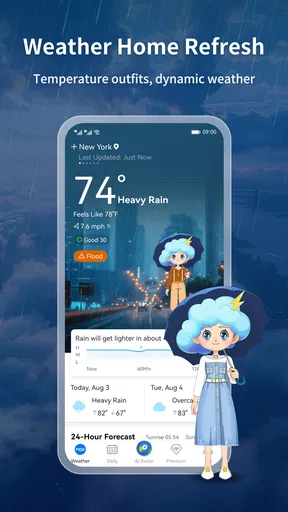
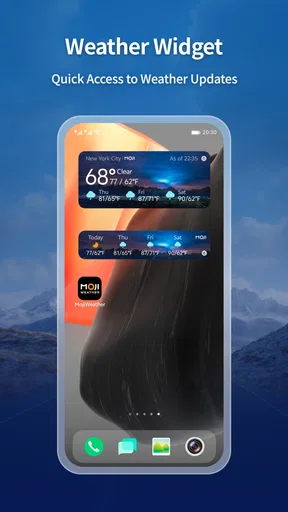
The interface is one of the cleanest I’ve seen among weather apps. Information is neatly organized, making it easy to find what you need. At a glance, you get the current temperature, a brief forecast, and some fun weather-themed emojis that add a bit of personality to your weather check. I found these emojis surprisingly helpful; they make it super easy to understand the weather at a glance, especially when you’re in a hurry.
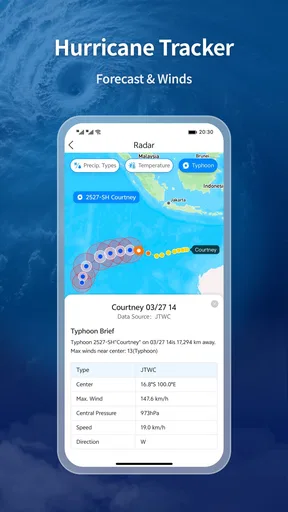
For those who love details, tapping through the app gives you access to hourly forecasts, precipitation maps, and even wind speed data. The radar feature is particularly cool, providing real-time updates that are essential for planning your day, or in my case, deciding whether to risk a bike ride without getting drenched.
Features That Stand Out
One of the standout features of MojiWeather is its weather radar. This isn’t just any radar; it’s detailed, accurate, and perfect for those who need to track storms or check for clear skies. The radar is overlaid on a map, and you can zoom in or out to focus on your specific region or get a broader view.
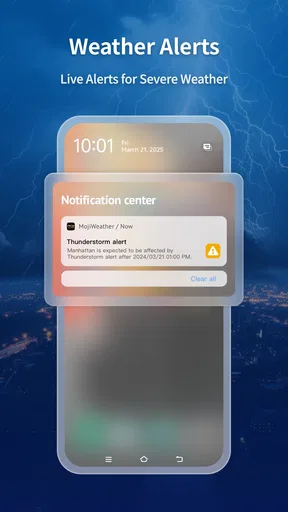
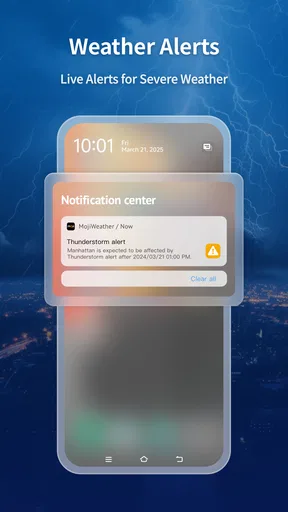
Another feature I enjoyed is the customizable notifications. You can set alerts for specific weather conditions, like rain or snow, so you’re never caught off guard. This is a lifesaver when you’re planning outdoor events or simply need to know when to bring in the patio cushions.
Personal Experience
Using MojiWeather has genuinely changed my daily routine. I used to rely on looking outside or checking generic forecasts, but this app provides such localized and precise information that it’s become my morning ritual. The app’s ability to update in real-time means I’m always in the loop about what’s happening weather-wise.
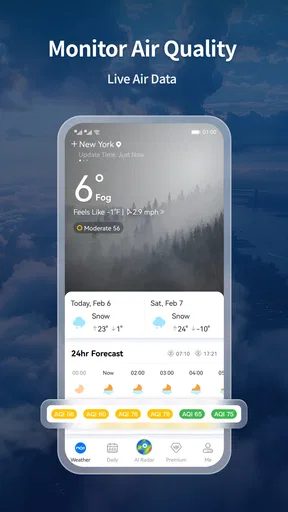
Plus, the app doesn’t just stop at weather. It offers air quality indices and pollen forecasts, which are crucial for someone like me who suffers from seasonal allergies. It’s like having a personal weather station in my pocket.
Room for Improvement
Of course, no app is perfect, and MojiWeather is no exception. While the app is packed with features, it can sometimes feel a bit overwhelming for new users. A brief tutorial or guide would be a nice addition for those who might not be as tech-savvy.
Additionally, while the app offers a free version, some features are locked behind a premium subscription. If you’re someone who wants the full package, be prepared to shell out a few bucks. But honestly, for the information and convenience it provides, it’s a small price to pay.
Conclusion
All in all, MojiWeather: Weather Radar is a robust and reliable weather app that’s certainly worth a try. Whether you’re a casual weather watcher or a storm-chasing enthusiast, this app has something to offer. It’s become an essential tool in my daily routine, and I’m genuinely impressed by its accuracy and ease of use.
So, if you’re tired of getting caught in the rain without an umbrella or just love having the latest weather updates at your fingertips, give MojiWeather a go. Who knows, it might just become your new favorite app too!
Pros
- Accurate local weather forecasts.
- User-friendly interface design.
- Interactive radar maps available.
- Customizable weather alerts.
- Supports multiple locations tracking.
Cons
- Contains in-app advertisements.
- Limited free features available.
- Occasional slow loading times.
- Requires internet for updates.
- Battery consumption can be high.
FAQs for MojiWeather: Weather Radar
What features does MojiWeather: Weather Radar offer?
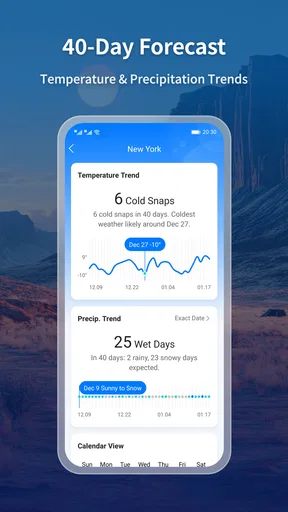
MojiWeather: Weather Radar provides users with real-time weather updates, interactive radar maps, and detailed forecasts for up to 10 days. It also includes severe weather alerts, customizable notifications, and a sleek, user-friendly interface. Additionally, it offers localized information such as air quality index and UV index, making it comprehensive for weather enthusiasts.
Is MojiWeather: Weather Radar free to use?
MojiWeather: Weather Radar offers a free version with essential features. However, to access more advanced functionalities, such as ad-free use and extended forecast details, users can opt for a premium subscription. The app provides a seamless experience in both its free and paid versions, catering to various user needs.
How accurate is the weather information provided by MojiWeather?
MojiWeather: Weather Radar uses advanced meteorological data from reliable sources to ensure high accuracy. The app regularly updates its information, utilizing sophisticated algorithms to predict weather changes. Users have reported satisfaction with the precision of forecasts, which cover both global and local scales efficiently.
Can I customize notifications in MojiWeather: Weather Radar?
Yes, MojiWeather: Weather Radar allows users to customize notifications according to their preferences. You can set alerts for specific weather conditions, such as rain or snow, and receive updates at your preferred times. This feature helps users stay informed about weather changes that might affect their daily plans.
Does MojiWeather support multiple locations?
MojiWeather: Weather Radar supports monitoring multiple locations, making it easy for users to track weather conditions in different areas. This feature is particularly useful for frequent travelers or those with family in various regions. Simply add your desired locations, and the app will provide updated forecasts and alerts for each.


